AI Agents — the roster
The Agent Hub is staffed by a roster of named agents, each a specialist in one part of the platform. You don't have to know which one to pick: the default agent, JARVIS, is an orchestrator that reads your request and auto-routes it to the right specialist. But you can also pick a specialist directly from the agent switcher when you know exactly whose job it is. This page introduces each agent, what it's for, and how the auto-routing works.
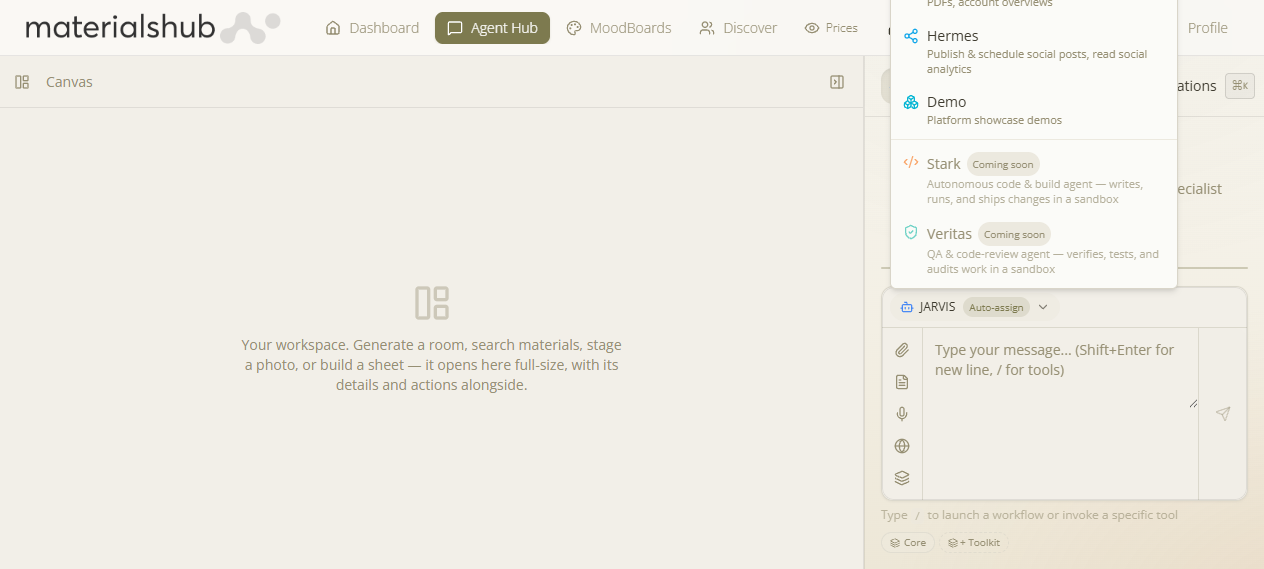
How to choose an agent
- Open Agent Hub and click New Conversation.
- Above the message box, open the agent switcher (a dropdown). Leave it on JARVIS (Auto-assign) to let it route for you, or pick a specialist.
- Type your request. With JARVIS, it's handed to whichever specialist owns the task; with a specialist selected, that agent handles it directly.
Why auto-assign helps: most requests don't map cleanly to one “mode” in your head — you just want the outcome. JARVIS looks at what you asked and dispatches it (a design request goes to Vision, a finance/quote request to Trinity, and so on), so you get the right tool without choosing it. Pick a specialist yourself only when you want to stay in one lane.
The agents
| Agent | What it's for |
|---|---|
| JARVIS default | Orchestrator & generalist — routes you to the right specialist automatically, and handles material intelligence and anything not owned by a specialist. If you're unsure, use JARVIS. |
| Vision | Interior design — image & 3D generation, virtual staging, relighting, moodboards and presentation sheets. (This is the design/visualisation agent.) |
| Pepper | Catalogs & research — building published catalogs, B2B/manufacturer research, the product knowledge-graph, the tech radar, and job research. |
| Edith | SEO & visibility — keyword/SERP/domain research and audits, content, and brand-mention & LLM-visibility monitoring. |
| Trinity | Finance & quotes — build quotes and branded PDFs, pull customer account overviews, and finance tasks. |
| Hermes | Social — publish & schedule social posts and read social analytics. |
| Demo | A lightweight showcase agent for demonstrating the chat experience. |
Each specialist carries only the tools for its area, which is what makes its answers focused. The full catalogue of what any agent can do — described as tasks, not tool names — is on Tools & Capabilities.
Coming soon — Stark & Veritas
Two more agents appear in the switcher as disabled “Coming soon” teasers: Stark — an autonomous build agent that writes, runs and ships changes in a sandbox — and Veritas — a QA & code-review agent that verifies, tests and audits work. They need a sandboxed execution tier that isn't switched on yet, so you'll see them listed but can't select them.
Tip: stay on JARVIS for almost everything and let it route. Reach for a specialist (e.g. Vision for a full design session, Trinity for a quoting session) when you want a focused, single-topic thread.