Knowledge Base
The Knowledge Base is your platform's public help centre — installation guides, how-to answers, certifications and materials know-how, in one searchable, browsable place. A visitor can search for an answer, browse by topic or brand, read a full article, or ask the AI assistant a question grounded in this content. Because it's public and SEO-friendly, it doubles as a marketing surface: real article pages that rank in Google and preview cleanly when shared. This guide walks the landing page, search, browsing, the article page, and the AI hand-off.
How to open it: open /knowledge-base — no sign-in required. From inside the app there's a Back to Platform link to return.
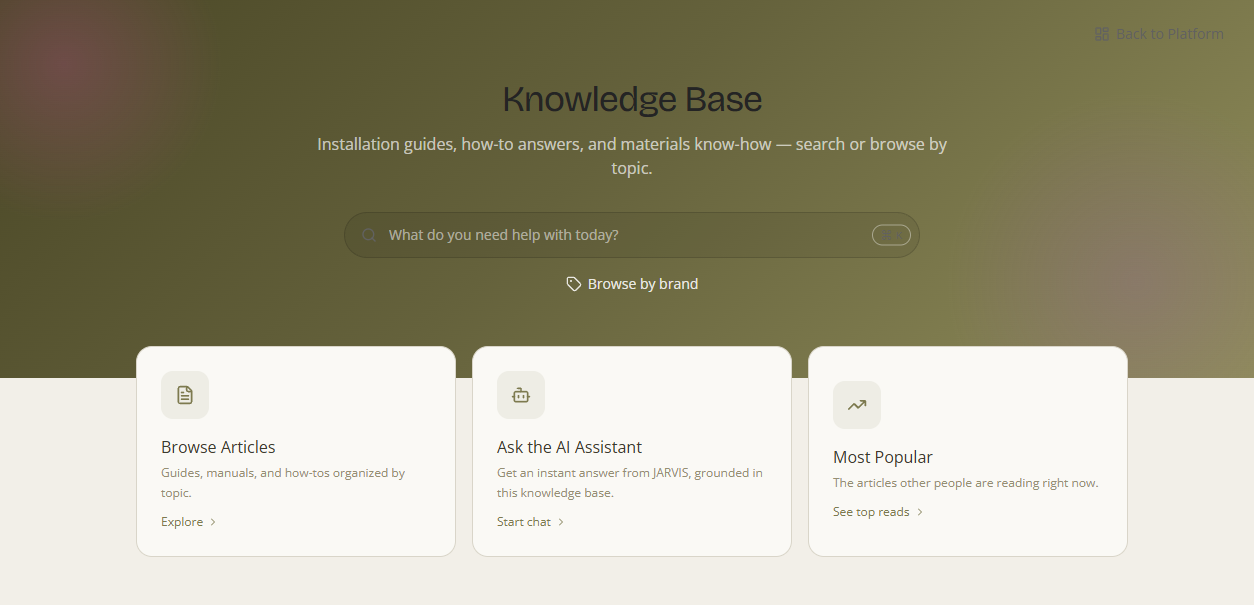
1. What it is
What it is — a help centre for the people you serve. Its content is knowledge articles — installation guides, manuals, how-tos, care instructions, certifications and FAQs — written and published by your team, organised so a visitor can find an answer fast. Why it matters — it deflects “how do I…?” questions, gives customers a self-serve reference, and (because every article is a real public web page) earns search traffic. Who it's for — anyone: customers, prospects and your own team — no account needed.
2. The landing page
The home screen is built to get a visitor to an answer in one step. It offers four ways in:
- Search — the prominent box (“What do you need help with today?”) searches across every article. There's also a ⌘K quick-search / command palette you can open from anywhere on the page.
- Browse Articles — “Guides, manuals, and how-tos organised by topic.” Opens the topic browser (see §3).
- Ask the AI Assistant — “Get an instant answer from JARVIS, grounded in this knowledge base.” Starts a chat that answers from this content (see §5).
- Most Popular — “The articles other people are reading right now” — a “see top reads” shortcut to the most-viewed articles.
3. Browsing — by topic and by brand
What it is — two structured ways to explore instead of searching. Why it matters — when a visitor doesn't have the exact words, browsing by the thing they do know — a topic or a brand — gets them there.
- Browse by Topic — articles are grouped into topics/categories; a Filter by category / All categories control narrows the list, and Popular topics surfaces the busy ones. (An empty topic reads “No articles in this topic yet.”)
- Browse by brand — jump to the articles tied to a specific brand (manuals, certifications, spec sheets for that maker).
The topics mirror your platform's material taxonomy, so the help centre stays organised the same way the rest of your catalogue is.
4. The article page
What it is — each published article has its own real, slug-based address at /knowledge-base/:slug Public — a proper page, not a pop-up. Why it matters — it's readable, linkable and built to be found. An article page includes:
- A breadcrumb back to its topic, and a Table of contents (“On this page”) for long articles.
- The article body, with images and formatting.
- A Frequently asked questions block where present.
- “Have questions about this article?” — a direct hand-off to the AI assistant about this content.
- Popular / related articles to continue reading.
Built to rank & share. Article pages carry proper search-engine metadata and structured data (JSON-LD) and are pre-rendered, so they can rank in Google and show a rich preview (title, summary, image) when the link is pasted into a chat, email or social post. To share one, just copy its address bar — no sign-in, no PDF attachment.
5. Ask the AI Assistant
What it is — for anything easier to ask than to find, Ask the AI Assistant (and the per-article “Have questions about this article?”) starts a chat with JARVIS that answers grounded in the knowledge base. Why it matters — the visitor gets a direct answer with the source articles behind it, and can keep asking follow-ups. It's the same assistant documented in the Agent Hub, pointed at this content.
6. Where the content comes from & who can see it
Articles are authored and published by your team in the admin Knowledge Base area; only published articles appear on the public site (drafts, internal and agent-only documents never show here). Catalogue ingestion can also generate knowledge entries, filed into the matching topic automatically. Being public means the help centre works as both your internal reference and a customer-facing resource at the same time.
Looking for materials, not articles? To search the product catalogue itself — by look, colour, material and spec — use the Agent Hub's material/visual search or Discover → Products. The Knowledge Base is for knowledge (guides, manuals, certifications, how-tos).