Documents · Expenses
Expenses is where you capture your business costs and categorise them, so the money you spend (or owe) is tracked the same way as the money you take in. It's one of the document tabs on the Finance page; this guide explains what it is, where to find it, how the list is laid out, how to record an expense step by step, and what it changes elsewhere.
Where it is
Top navigation → Finance → the Expenses tab. Each tab on the Finance page is one document type; Expenses is the one for business costs.
What an expense is for — every time you pay (or owe) a supplier — materials, rent, subscriptions, services. Assign an expense category so the cost lands in the right report bucket.
What's on the screen
What it is — the list of your business costs, captured and categorised. When you'd use it — to record a cost, to pull in documents suppliers already filed against your VAT number, or to find a specific cost you've already logged. How — use Sync from myDATA to pull in expense documents suppliers already filed against your VAT number, or record them manually; assign an Expense category so the cost lands in the right report bucket. Search by supplier or VAT number to find a specific cost.
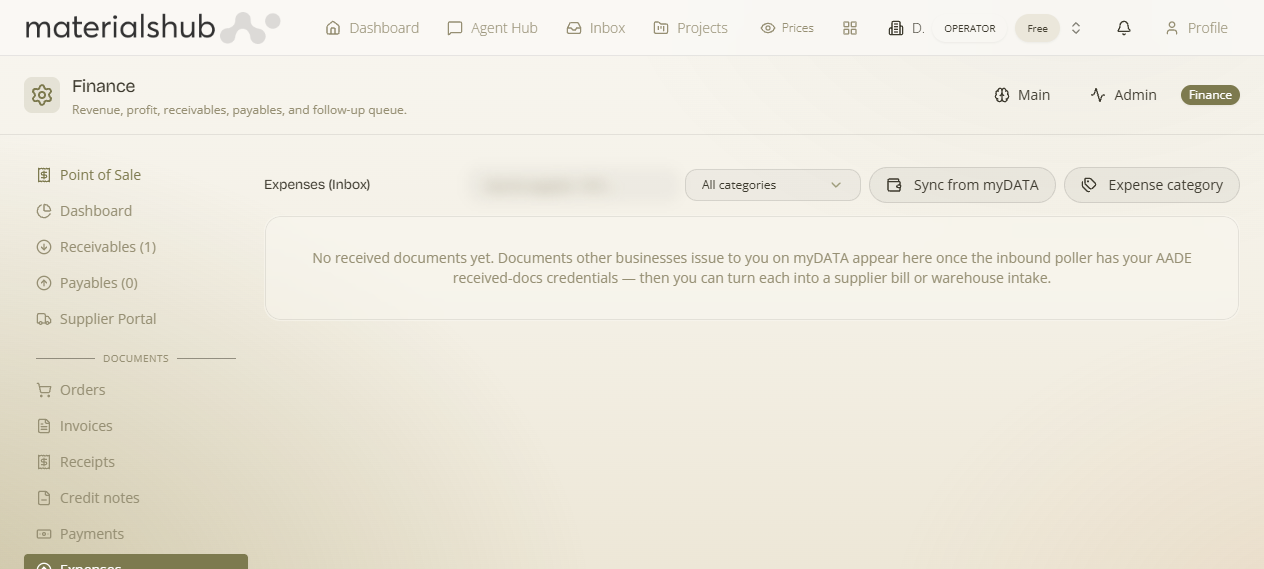
Toolbar
Sync from myDATA · Expense category (manage list) · All categories filter · search by supplier / VAT.
- Sync from myDATA — pulls the documents the tax authority already has on file for your business, so incoming expenses can be reconciled without re-keying them. This is how documents others issued to you appear automatically. It only works once you've entered your myDATA inbox credentials in Finance Settings → Documents.
- Expense category — opens the manager for the category list used across the document lists, filters and reports. These same categories are also editable inline on a document header, so you can keep your books consistent without leaving the document you're working on. See Finance settings.
- All categories filter — narrow the list down to one expense category to review everything in one bucket.
- Search by supplier / VAT — finance histories grow fast; search by supplier or VAT number to re-open a specific cost.
How to record an expense — step by step
Expenses are quicker than invoices — there's no PDF to send, just a cost to capture and categorise:
- Open Finance from the top navigation, then select the Expenses tab.
- Start a new expense.
- Pick the supplier.
- Enter the amount and VAT.
- Assign an expense category from the document header so it reports correctly.
- Save. The expense feeds Payables and the finance Reports.
Instead of typing expenses one by one, try Sync from myDATA on the Expenses tab to pull in documents your suppliers already filed against your VAT number — then you only need to categorise them.
Worked example — recording a materials bill from a supplier
Open Finance → Expenses → start a new expense → pick the supplier → enter the amount and VAT → set the expense category to the right cost bucket → Save. The cost now shows in Payables as something you owe, and counts towards the matching category in your finance Reports. If the supplier had already filed the document against your VAT number, you could have used Sync from myDATA to pull it in instead of keying it, then only needed to categorise it.
What it affects elsewhere
Expenses are your business costs, categorised; they feed Payables (what you owe) and the finance Reports. Categorising them well is what makes those reports meaningful — without categories every figure is one undifferentiated lump.
Nothing here is a dead end — every expense you record moves a balance or a report. See also: Receivables & Payables and Reports.