Operations · Warehouse
The Warehouse is the stock side of the business: the inventory that backs your products and links into delivery and dispatch. If you sell and ship physical materials, on-hand quantities have to match reality or you'll oversell, miss reorders, or ship what you don't have.
Now its own module. Inventory has been extracted from Finance into the dedicated Stock Management add-on — with multi-warehouse movements, stock counts, an AI resupply forecast and container tracking. Enable it from the App Launcher. This page describes the core warehouse concepts; the fuller, current capabilities live on the Stock Management page.
Where it is
The inventory now lives in the Stock Management module at /stock (formerly the Finance → Warehouse tab).
This tab shines for product / stock-based businesses. If it looks empty, it isn't broken — it just means there are no stock entries yet. Add items and the tab fills itself in.
What's on the screen
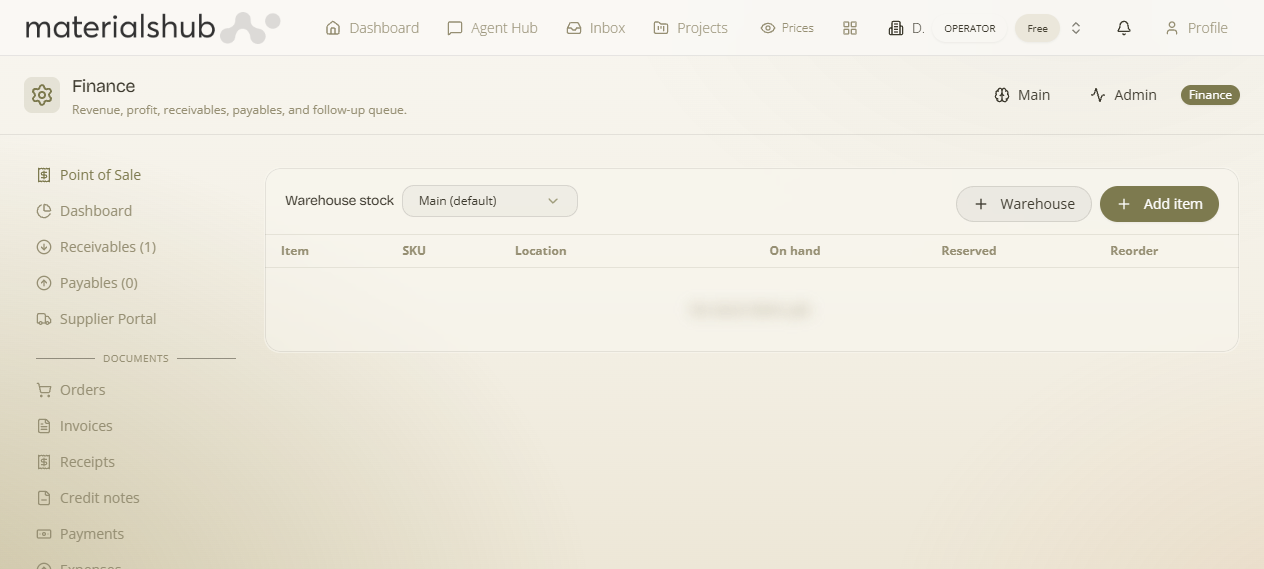
A stock list with the controls for choosing where stock lives and adding new items:
- Warehouse selector — choose where the stock lives by switching between Main (default) and Warehouse.
- Add item — register a new stock item.
- The stock table — one row per item, with the columns described below.
What the columns mean
| Column | What it shows |
|---|---|
| Item | The stock item name. |
| SKU | Stock-keeping unit / code. |
| Location | Where it sits in the warehouse. |
| On hand | Quantity physically in stock. |
| Reserved | Quantity already committed/allocated. |
| Reorder | Reorder threshold for the item. |
How to receive stock into the Warehouse — step by step
- Open Finance → Warehouse.
- Use the Warehouse selector to choose where the stock lives — switch between Main (default) and Warehouse.
- Click Add item to register a new stock item.
- Fill in the item's details (see the columns above) — its name, SKU, where it sits, and the quantity you have on hand.
- Set the Reorder threshold so the item flags itself when stock runs low.
Worked example — what you can still promise. An item shows On hand 40 and Reserved 30. The headline quantity looks healthy, but On hand minus Reserved is what you can actually still promise to a customer — here that's only 10. Watch the gap, not just the headline quantity.
What it affects elsewhere
Stock here backs your products and links into the delivery/dispatch flow — what you have On hand versus Reserved is what dispatch and delivery draw against. Keeping it current is what makes the Dispatch board trustworthy.