Settings · e-Invoicing
This section is a simple progress tracker for switching your account on to electronic invoicing through Novus to myDATA. It does not transmit anything itself — it just records where you are in the activation process so anyone on the team can see the current state at a glance. The actual sending of invoices to myDATA happens elsewhere, once activation is complete.
Where it is
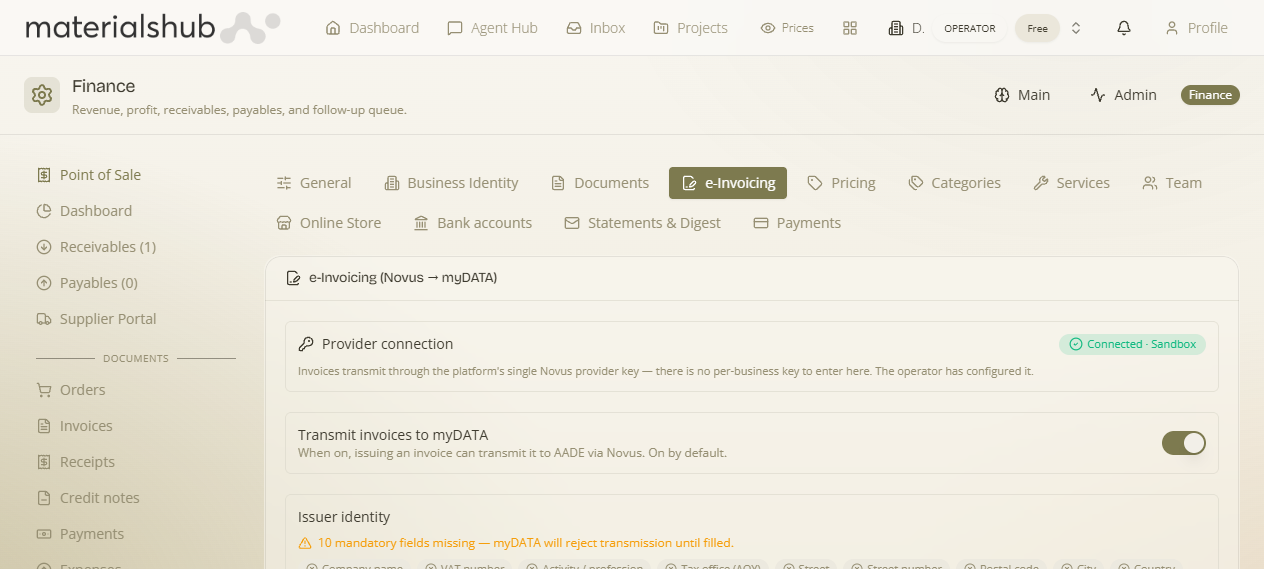
Top navigation → Finance → Settings tab → e-Invoicing (in the row of settings sub-tabs). The heading on the panel reads "e-Invoicing (Novus → myDATA)".
What's on the screen
The panel is deliberately small — three controls, top to bottom:
- Status — the main control. It starts at "Not requested" and tracks how far along your Novus → myDATA activation is. You move it forward as each step in the activation completes, so the rest of the team can see whether e-invoicing is still being set up or is live.
- Note (optional) — a free-text field for the details worth remembering about the activation: the contract number, the date you submitted the request, or who handled it. Nothing here is sent anywhere — it's a memo for your own records.
- Save status — the button that stores the current Status and Note. Nothing you change takes effect until you click it.
How to record activation progress — step by step
- Go to Finance → Settings → e-Invoicing.
- Open the Status control. It begins at "Not requested" — that's the state before you've asked Novus to switch you on.
- As your activation moves forward, set the Status to match where you actually are (for example, once you've submitted the request to Novus, advance it from "Not requested").
- In the Note field, jot down anything worth keeping — the contract number, the date you submitted, or the name of the person who handled it. This is optional but makes the record useful later.
- Click Save status. The Status and Note are stored and visible to the rest of the team the next time they open this panel.
- Repeat as the process advances — update the Status (and the Note) each time something changes, then Save again.
Worked example — kicking off activation. Open e-Invoicing → the Status reads "Not requested" → you submit your activation request to Novus → come back here, move the Status forward, type the contract number and today's date into the Note (e.g. "Contract #4471, submitted 20/06, handled by Maria"), and click Save status. Now anyone on the team who checks this panel can see the request is in flight and who to ask about it.
What it affects
This panel only records the state of your activation — it's documentation, not the transmission mechanism. Once activation is complete and e-invoices are flowing, the actual sending to myDATA is driven from the transmission flow. For how invoices are transmitted (and how to read their myDATA status), see Finance → e-Invoicing.