Settings · Business Identity
Business Identity is where you enter your company's details once so they appear correctly everywhere — on every invoice and receipt, in what you send to the Greek tax authority (myDATA), on your public profile/storefront, and in the emails the platform sends. This page lists every field, where it lives, what to put, and why it matters, so you can fill it in confidently.
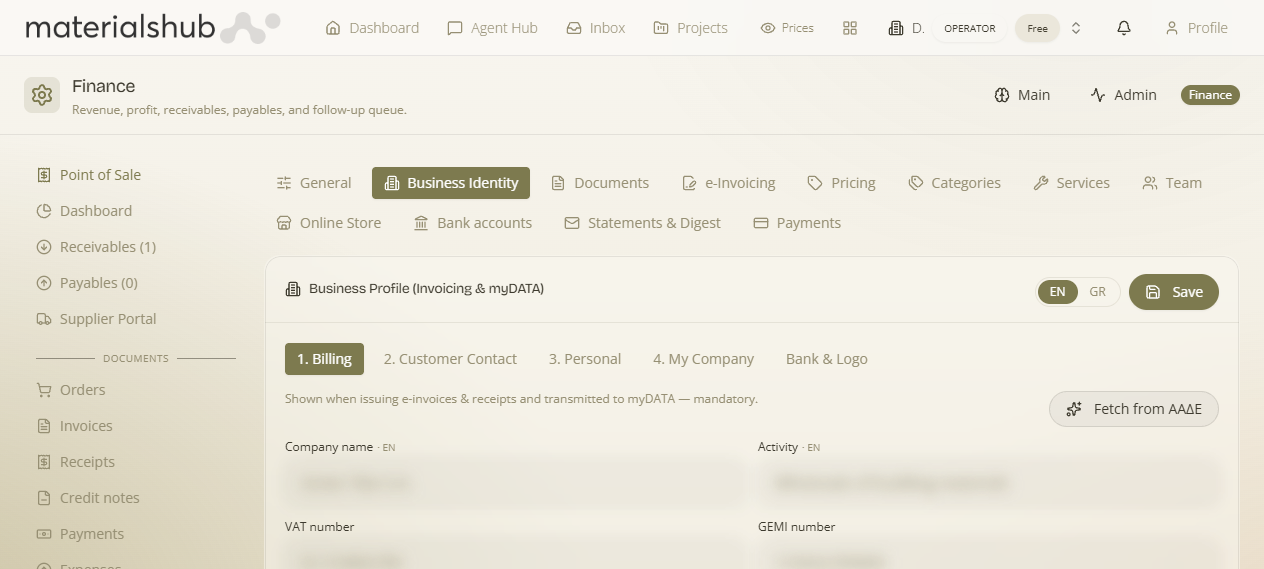
Where: top navigation → Finance → Settings tab → Business Identity. The section is split into five sub-tabs across the top: 1. Billing, 2. Customer Contact, 3. Personal, 4. My Company and Bank & Logo. Click Save after editing.
Two things to know before you fill it in
- Every text field is bilingual. Each field shows an ·en / ·gr marker, and there's an EN / GR toggle at the top. Fill the Greek version for Greek documents/myDATA; add the English version if you also invoice international clients. The right language prints automatically per document.
- Don't type it all by hand. On the Billing tab, enter your VAT number and click Fetch from ΑΑΔΕ — the platform pulls your official company name, activity, tax office and registered address straight from the tax registry, so they exactly match what myDATA expects. Then just fill the gaps below.
1. Billing — your legal identity (prints on documents & goes to myDATA)
This is the mandatory, official part. Where: the 1. Billing sub-tab. Why it matters: these exact details head every invoice/receipt and are transmitted to myDATA as the issuer — if any are wrong, your documents are legally wrong.
| Field | What to enter | Why it's needed |
|---|---|---|
| Company name | Your registered legal name (e.g. Acme Tiles S.A.). | The legal issuer name on every document and in myDATA. |
| Activity | Your business activity (e.g. Wholesale of building materials). | Printed on documents; describes what you trade in. |
| VAT number | Your ΑΦΜ, e.g. EL123456789. | Your tax identifier — keys the ΑΑΔΕ lookup and every myDATA submission. |
| GEMI number | Your General Commercial Registry number. | Required on Greek commercial documents. |
| Tax office (ΔΟΥ) | Your tax office, e.g. FAE Athinon. | Printed on invoices; identifies which authority you file under. |
| Street · Number · Postal code · City · Country | Your registered address. | The issuer's registered address on documents and in myDATA. |
| Country code | Two-letter code, e.g. GR. | Used for international documents/VAT handling. |
| Phone · Fax · Email | Your billing contact details. | Printed so customers can reach your billing desk. |
| Other | Free text — e.g. a branch label or note. | Optional extra line on the document header. |
2. Customer Contact — what your customers see
Where: the 2. Customer Contact sub-tab. Why it matters: these are the public-facing, friendly details shown on your storefront/profile and customer-facing material — separate from the strict legal block above.
| Field | What to enter | Why it's needed |
|---|---|---|
| Display name / brand | Your trading name (e.g. Acme Tiles). | The brand customers see (may differ from the legal name). |
| Contact email | Your public enquiries email. | Where customers reach you. |
| Company phone · Fax | Public phone/fax. | Shown on customer-facing surfaces. |
| Website | Your site URL. | Linked from your profile/storefront. |
| LinkedIn · Facebook | Your social profile URLs. | Shown as social links. |
| Opening hours | e.g. Mon–Fri 9:00–17:00. | Displayed so customers know when you're open. |
3. Personal — your internal/responsible contact
Where: the 3. Personal sub-tab. Why it matters: this is the internal owner of the account — who the platform notifies and who's responsible — not shown to customers.
| Field | What to enter | Why it's needed |
|---|---|---|
| Responsible person | The person accountable for the account (e.g. Maria Papadopoulou). | Internal owner of record. |
| Landline · Mobile | Direct numbers for that person. | Internal contact. |
| Notifications email | Where platform alerts should go. | The inbox for system notifications. |
| Correspondence address | A mailing address if different from the registered one. | For post/correspondence. |
| Notes & instructions | Anything the team should know. | Free-text internal notes. |
4. My Company — company classification
Where: the 4. My Company sub-tab.
| Field | What to enter | Why it's needed |
|---|---|---|
| Company type | Your legal form (e.g. S.A., Ltd, sole trader). | Classifies the business. |
| Operating | Whether the business is currently operating. | Status flag for the account. |
| Main activity | Your primary line of business. | Categorises what you do. |
5. Bank & Logo — payment details & branding on documents
Where: the Bank & Logo sub-tab. Why it matters: these are the two things customers most need on an invoice — how to pay you, and your branding.
| Field | What to enter | Why it's needed |
|---|---|---|
| Payment accounts (shown on invoices) | Your bank account(s) / IBAN(s). | Printed on invoices so customers know where to pay. |
| Logo (printed on invoices) | Upload your company logo. | Brands every generated document PDF. |
How to fill it in — recommended order
- On Billing, set the toggle to GR, type your VAT number, click Fetch from ΑΑΔΕ, then fill any gaps (GEMI, phone, email).
- On Bank & Logo, add your IBAN(s) and upload your logo.
- On Customer Contact, add your brand name, website, socials and opening hours.
- On Personal, set the responsible person and the notifications email.
- On My Company, set the company type and main activity.
- (Optional) switch to EN and add English versions if you invoice abroad. Click Save.
What this powers
- The header/footer, payment details and logo on every document PDF.
- The issuer block sent to myDATA — a prerequisite for Greek e-invoicing.
- Your public profile and online store (brand, contact, hours).
- Where the platform sends you notifications (the notifications email).