Settings · Pricing (resale pricing engine)
Pricing is where you set up how a catalogue product's cost becomes the price a specific customer pays — automatically, every time you add it to a quote. It works in layers: a markup turns cost into a list price, a customer's pricing level gives them their standing discount, optional per-category tweaks fine-tune that, and custom rules add volume or cash discounts on top. This page explains every card on the screen — what each field does, where it is, and why you'd use it.
Where: top navigation → Finance → Settings tab → Pricing. The page stacks five cards top to bottom: Category Markup Rules, Customer Pricing Levels, Level Discounts by Category, Custom Pricing Rules, and (when there's anything waiting) Pending Discount Approvals.
How the layers fit together
When you add a catalogue product to a quote for a customer, the price is built in this order:
- Cost → list price using the product category's markup (Card 1), falling back to the default markup.
- Apply the customer's pricing level discount (Card 2) — overridden for specific categories by Card 3.
- Apply any custom rules that match (Card 4) — e.g. a volume break or a paid-upfront cash discount, on top of the level discount.
All discounts are calculated ex-VAT. A customer's level is assigned on their CRM record; if they have none, they pay the list price.
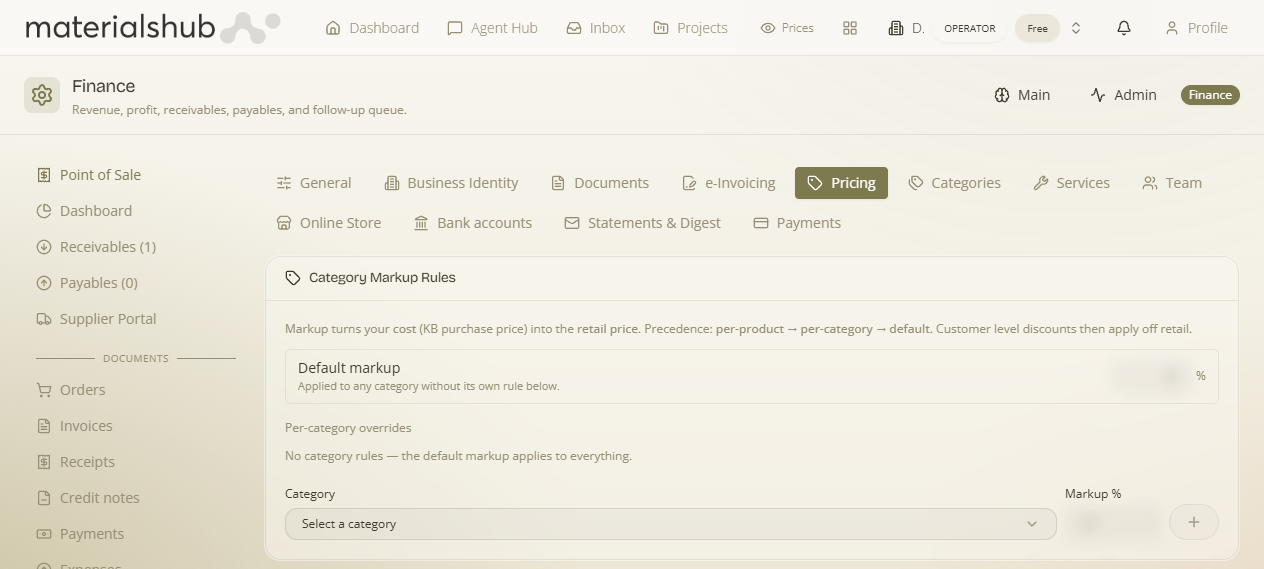
Card 1 — Category Markup Rules (cost → list price)
Why: so you never price by hand. Set a markup per category and every product in it is priced consistently the moment you add it.
| Field | What to enter | Why |
|---|---|---|
| Default markup (Markup %) | A blanket percentage, e.g. 25. | Applied to any category that doesn't have its own rule below — “Applied to any category without its own rule.” |
| Per-category overrides — Category + Markup % | Pick a category, set its own markup, add it. | Gives that category a different uplift from the default (e.g. tiles 25%, lighting 40%). |
Empty state: “No category rules — the default markup applies to everything.” This default is the same value as Default catalog markup % in General.
Card 2 — Customer Pricing Levels (who gets what discount)
Why: different customer tiers (retail, installer, importer…) buy at different prices. A level is a named tier with a standing discount off the list price; you then assign each customer a level in CRM.
| Field / control | What to do | Why |
|---|---|---|
| New level (name) | Type a tier name, e.g. Importer, and add it. | Creates the tier customers can be put in. |
| % off | The level's default discount off list, e.g. 15. | The standing discount everyone on that level gets. |
| Set default | Mark one level as the default. | New customers fall into this level until you change them. |
Card 3 — Level Discounts by Category (fine-tuning per category)
Why: a tier might get a bigger discount on one category than another. This overrides a level's default % for a specific category only.
| Field | What to enter | Why |
|---|---|---|
| Level | The pricing level to adjust. | Which tier this override applies to. |
| Category | The product category. | Which category gets the different discount. |
| % off | The category-specific discount for that level. | Replaces the level's default discount for that one category. |
Empty state: “No category overrides — each level's default discount applies everywhere.”
Card 4 — Custom Pricing Rules (automatic extra discounts)
Why: reward bulk orders or upfront payment without anyone remembering to apply it. “Extra discounts applied automatically on quotes, on top of the customer's level discount (all ex-VAT).”
| Field | What to enter | Why |
|---|---|---|
| Type | Volume (per category) — a quantity break — or Paid upfront (cash). | Chooses the trigger for the extra discount. |
| Category | The category the rule applies to. | Scopes the rule. |
| Min qty (volume rules) | The quantity that unlocks the discount. | e.g. 100+ units of a category. |
| Category extra (%) | The additional discount to apply. | The bonus on top of the level discount. |
Empty state: “No custom rules yet.” A Paid upfront (cash) rule is what produces the cash-discount line you see on quotes and invoices.
Card 5 — Pending Discount Approvals
Why: when a quote's discount goes beyond what's allowed (or a line would sell below cost), it isn't applied silently — it's raised for approval. This card lists those requests for a finance approver to release or decline. The salesperson is told it's pending; once released, the discount takes effect. (See the sales side on building a quote.)
Who sees which price — per-viewer pricing & the “Show Prices” toggle
Because the same product costs different customers different amounts, the price shown is computed for the viewer, and you can hide prices entirely when you don't want them on screen.
- Per-viewer price. Product cards, agent-chat results and the public catalogue show the price for the current viewer/customer — their level discount applied — rather than a single list price. A customer browsing sees their price; a guest sees the public price (if prices are shown at all).
- VAT-inclusive (gross) display. Where a customer should see gross figures, prices are shown VAT-inclusive for that customer, so the number on screen is what they'd actually pay.
- “Show Prices” toggle (in the header). A global Show Prices switch lets anyone hide every price across the browsing experience in one click — product cards, the public catalogue and agent-chat results all respect it. Use it for screen-sharing, showrooming, or presenting to a client without prices in view. The choice is remembered on your device.
- Public catalogue gating. A published catalogue only shows prices when the toggle allows it — so you can publish a catalogue as a visual showcase with prices off, or with per-viewer prices on.
Category tree & rule inheritance. Markup and level discounts follow the material-category tree: a rule set on a parent category is inherited by its sub-categories unless a sub-category has its own rule. Material categories (their sub-category tree and name aliases used to match imported data) are maintained by admins in the Materials area; the inheritance is what lets you set broad rules once and override only where needed.
What this powers
- Every catalogue line you add to a quote is priced through these layers automatically.
- A customer's level and any per-customer overrides live on their CRM record.
- The Paid upfront (cash) rule drives the cash-discount line that flows from quote to invoice.
- Over-limit discounts and below-cost lines route to Pending Discount Approvals (and the order/credit guardrails in General).