CRM
CRM is your relationship hub — the people and companies you do business with, plus the platform users in your workspace. It's organised into four tabs, and each is documented in full (every column, every form field, how to add and edit records, and how it feeds invoicing and outreach) on its own page below.
How to open it: top navigation → CRM. Switch between the Users, Contacts, Companies and Categories tabs. A summary strip across the top shows Total Users, Active Users, Total Contacts and Total Companies.
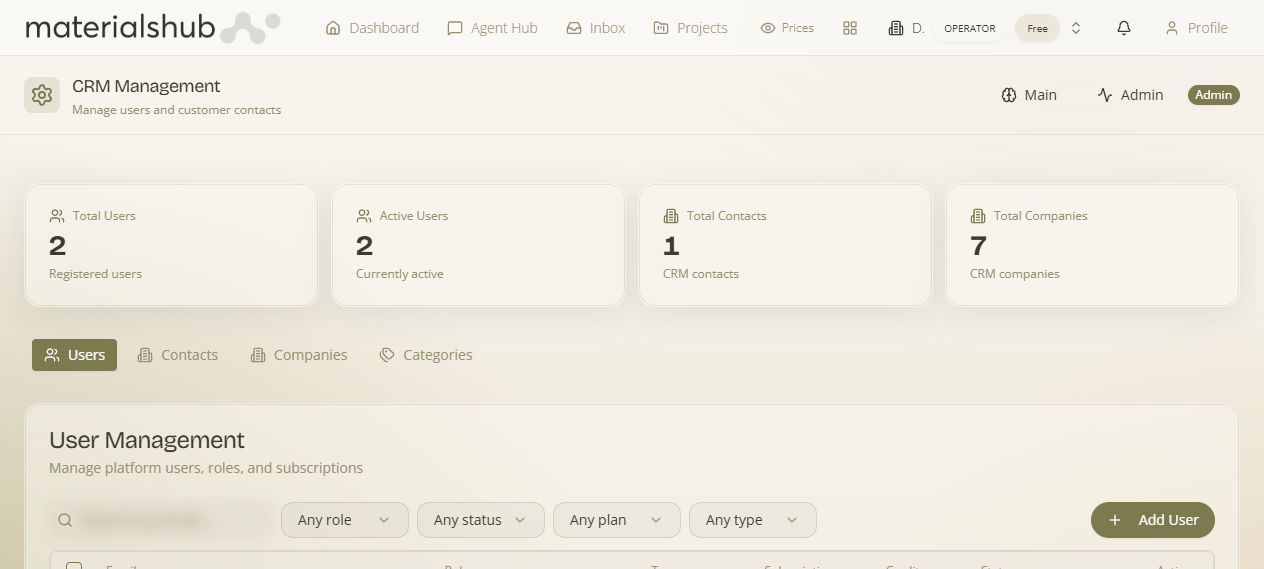
The four tabs
Users
Platform users in the workspace — roles, subscription, credits, status. Add or manage logins.
Contacts
Individual people — full contact form: lead info, pricing, invoicing & VAT, Create & Invite User.
Companies
Organisations, suppliers & customers — with VIES VAT validation and billing details.
Categories
Group people/companies into lists for "Send to Customers" outreach and filtering.
How it connects to the rest of the platform
- Customers and suppliers you create here are who you pick when raising quotes and invoices/bills.
- The billing details, VAT number, credit limit and segment on a record drive validation and limits at invoice time (see Finance → Settings → General).
- Suppliers must be marked is_supplier here to appear in Payables.
- Categories power targeted email outreach such as "Send to Customers" on catalogs.
CRM is gated by the crm.view capability. An Admin sub-view (visible to operators) adds platform-wide user management beyond the standard CRM.